Created page with "== Sibilance == Sometimes a vocal can sound very irritating—listen to 10 s of this (start at 4:01): <youtube>JEHmr1__AsM</youtube> That “S” sound at the end of a word is called “sibilance”. It occurs typically in the 4 to 8 kHz range; that same range is needed to get clarity and presence in a vocal. Too much, almost like symbols, very quickly becomes very irritating. However, too little, and a person battle to hear what is being said. <pic src="/images/e/e7/..." |
m Better image of dynamic gain reduction |
||
| (3 intermediate revisions by 2 users not shown) | |||
| Line 1: | Line 1: | ||
== Sibilance == | == Sibilance == | ||
To address sibilance—the harsh, irritating "essss" sound—on a DiGiCo Sx1, one can use a dynamic EQ: | |||
< | <pic src="/images/b/be/Dynamic_EQ_on_S31_for_sibilance.jpg" width="100%" align="text" caption="DiGiCo's S31 dynamic EQ: Here, the blue band has the dynamic EQ turned on; here, around 5.5 kHz, the volume is currently being lowered, which corresponds to the RTA frequency during the 's' sound." /> | ||
=== Steps to follow: === | |||
* Touch the "Show dyn EQ" button in the menu bar, and then switch one of the EQs to a dyanmic EQ | |||
* Dynamic EQ must be in "Over mode", i.e. arrow on threshold pointing to right, i.e. when level is higher than threshold, the EQ adjustment is applied | |||
* Dynamic compression ratio of 2:1 to 3:1 has enough of an effect without influencing the sound too much | |||
* The compressor must typically be quite fast, i.e. short times, to sound as natural as possible | |||
* EQ frequency typically in the range 3 to 8 kHz | |||
* EQ gain should be –5 to –15 dB; if too much, intelligibility will be reduced | |||
* EQ Q typically 1 or higher | |||
=== What exactly is sibilance? === | |||
Sometimes audio that has been pre-recorded and prepared for playback can have too much harshness: | |||
<youtube>mAlhPGCET8M</youtube> | |||
or a live vocal can sound very irritating, especially in Afrikaans—same video, [[https://www.youtube.com/live/mAlhPGCET8M?t=1383 later at 23:03]]. | |||
Also, listen to 10 s of this (start at 4:01): | |||
<youtube>JEHmr1__AsM</youtube> | |||
That “S” sound at the end of a word is called “sibilance”. It occurs typically in the 3 to 8 kHz range; that same range is needed to get clarity and presence in a vocal. Too much, almost like cymbals, very quickly becomes very irritating. However, too little, and a person battles to hear what is being said. | |||
<pic src="/images/e/e7/Sibilance.wy_of_wys.png" width=100% align=text caption="From the clip: This is the 'wy' of 'wys' in 'Wil ek vir jou wys wat leer...': the frequencies shown at the bottom correspond to the yellow cursor at the top."/> | |||
<pic src="/images/7/7e/Sibilance.s_of_wys.png" width=100% align=text caption="This is the 's' of 'wys' in 'Wil ek vir jou wys wat leer...'—note the portion that is significantly louder. The 5 kHz peaks at –50 dB, which was previously –63 dB—that’s a 13 dB difference, which represents more than four times the volume (6 dB is a doubling)."/> | |||
The process of removing sibiliance is called “de-essing” or “desibilising” (https://en.wikipedia.org/wiki/De-essing). | |||
The first step in the process of improving sound is normally recording better quality sound at the sound, thus placing the microphone further away, and aiming the microphone higher or lower (away from the mouth), as you can see in, for e.g. https://www.soundonsound.com/techniques/managing-sibilance or https://urm.academy/death-to-sibilance/. | |||
If one already has the sound, you can process it via an EQ. The challenge with this is that taking away too much of the “s” sound results in losing clarity and presence. Thus one wants to only take away the problematic portions when they are excessive, but leave them the rest of the time, i.e. compress that which annoys, but only when necessary. | |||
<pic src="/images/c/c1/Sibilance.reaper.de-esser.png" width=100% align=text caption="Reaper’s built-in 'De-esser'"/> | |||
Reaper’s “De-esser” is a single-band dynamic EQ. | |||
Latest revision as of 15:02, 22 May 2026
Sibilance
To address sibilance—the harsh, irritating "essss" sound—on a DiGiCo Sx1, one can use a dynamic EQ:
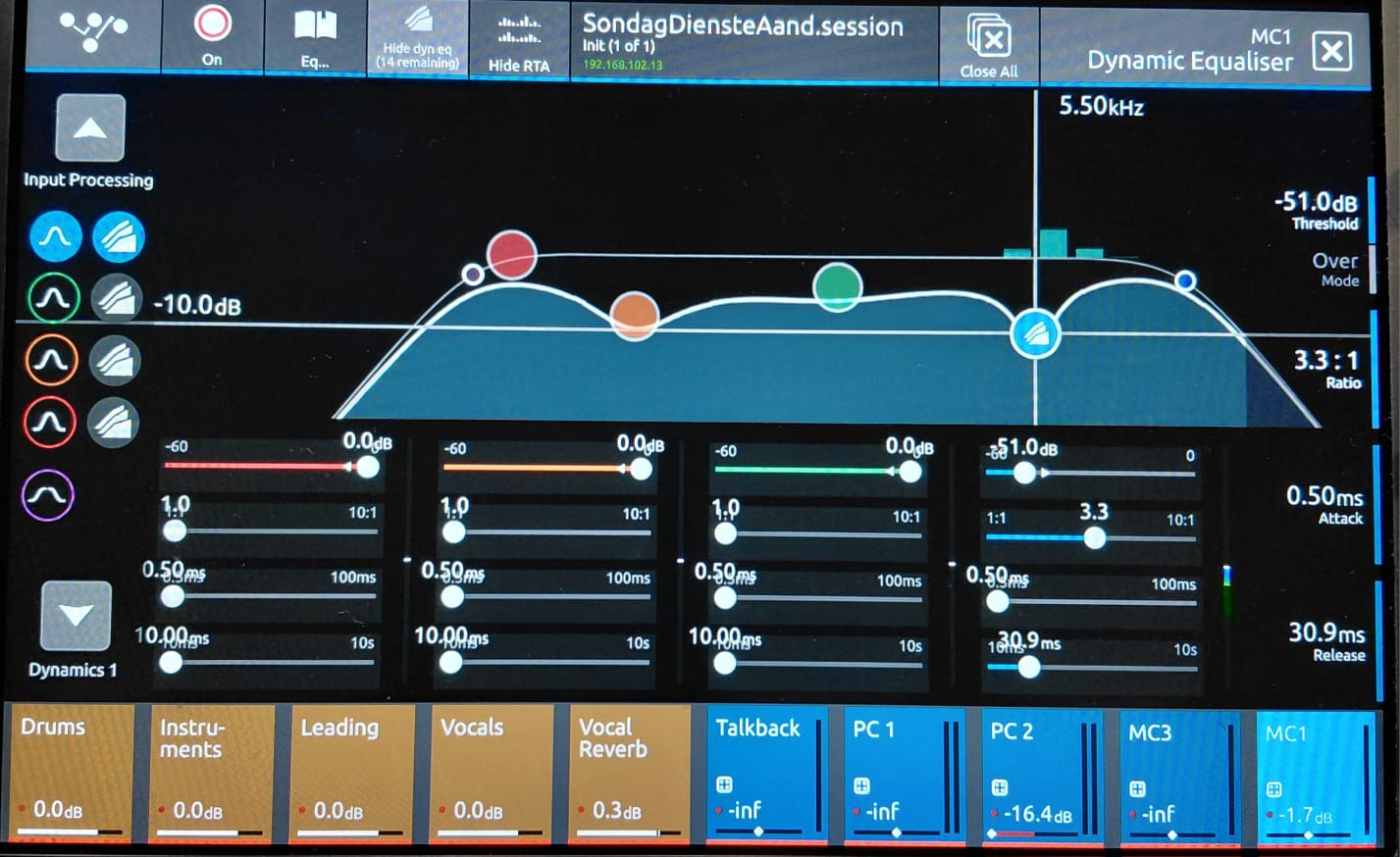 |
DiGiCo's S31 dynamic EQ: Here, the blue band has the dynamic EQ turned on; here, around 5.5 kHz, the volume is currently being lowered, which corresponds to the RTA frequency during the 's' sound. |
Steps to follow:
- Touch the "Show dyn EQ" button in the menu bar, and then switch one of the EQs to a dyanmic EQ
- Dynamic EQ must be in "Over mode", i.e. arrow on threshold pointing to right, i.e. when level is higher than threshold, the EQ adjustment is applied
- Dynamic compression ratio of 2:1 to 3:1 has enough of an effect without influencing the sound too much
- The compressor must typically be quite fast, i.e. short times, to sound as natural as possible
- EQ frequency typically in the range 3 to 8 kHz
- EQ gain should be –5 to –15 dB; if too much, intelligibility will be reduced
- EQ Q typically 1 or higher
What exactly is sibilance?
Sometimes audio that has been pre-recorded and prepared for playback can have too much harshness:
or a live vocal can sound very irritating, especially in Afrikaans—same video, [later at 23:03].
Also, listen to 10 s of this (start at 4:01):
That “S” sound at the end of a word is called “sibilance”. It occurs typically in the 3 to 8 kHz range; that same range is needed to get clarity and presence in a vocal. Too much, almost like cymbals, very quickly becomes very irritating. However, too little, and a person battles to hear what is being said.
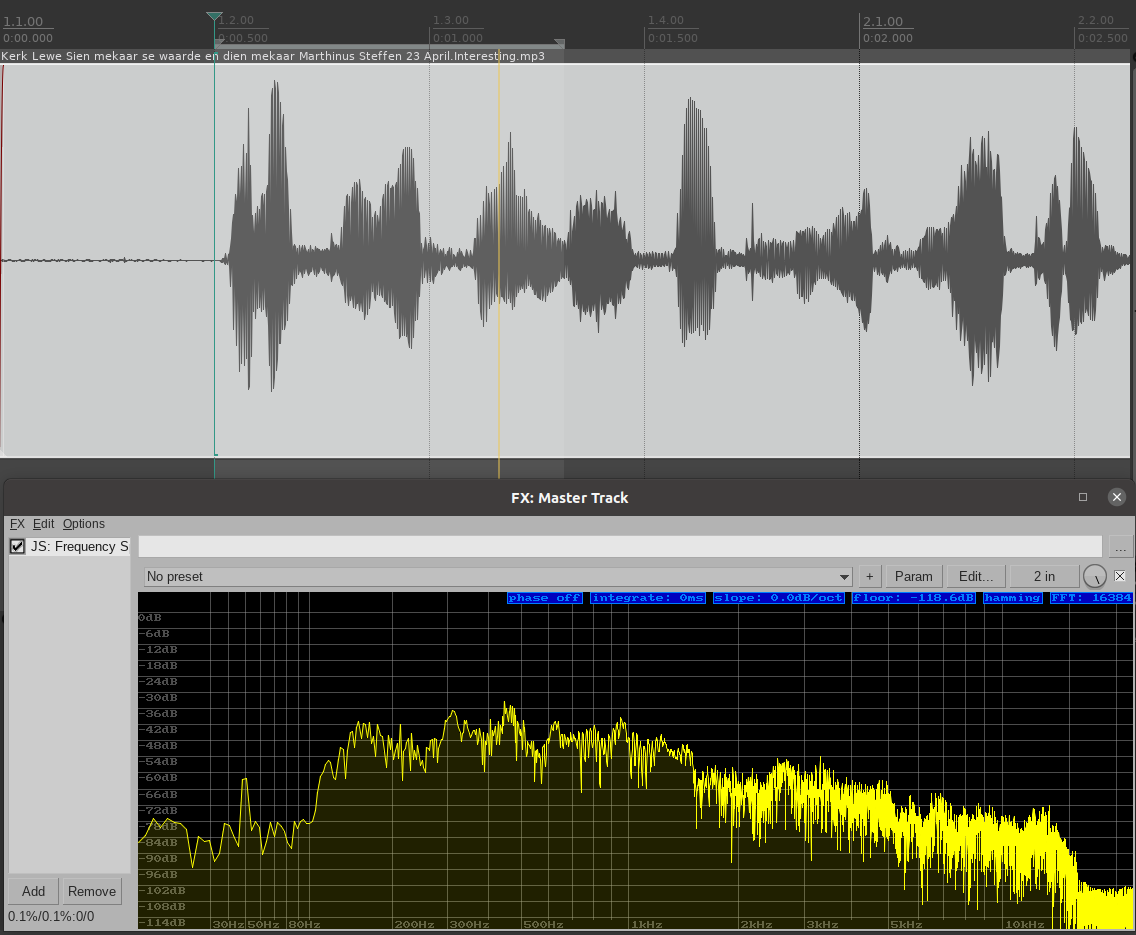 |
From the clip: This is the 'wy' of 'wys' in 'Wil ek vir jou wys wat leer...': the frequencies shown at the bottom correspond to the yellow cursor at the top. |
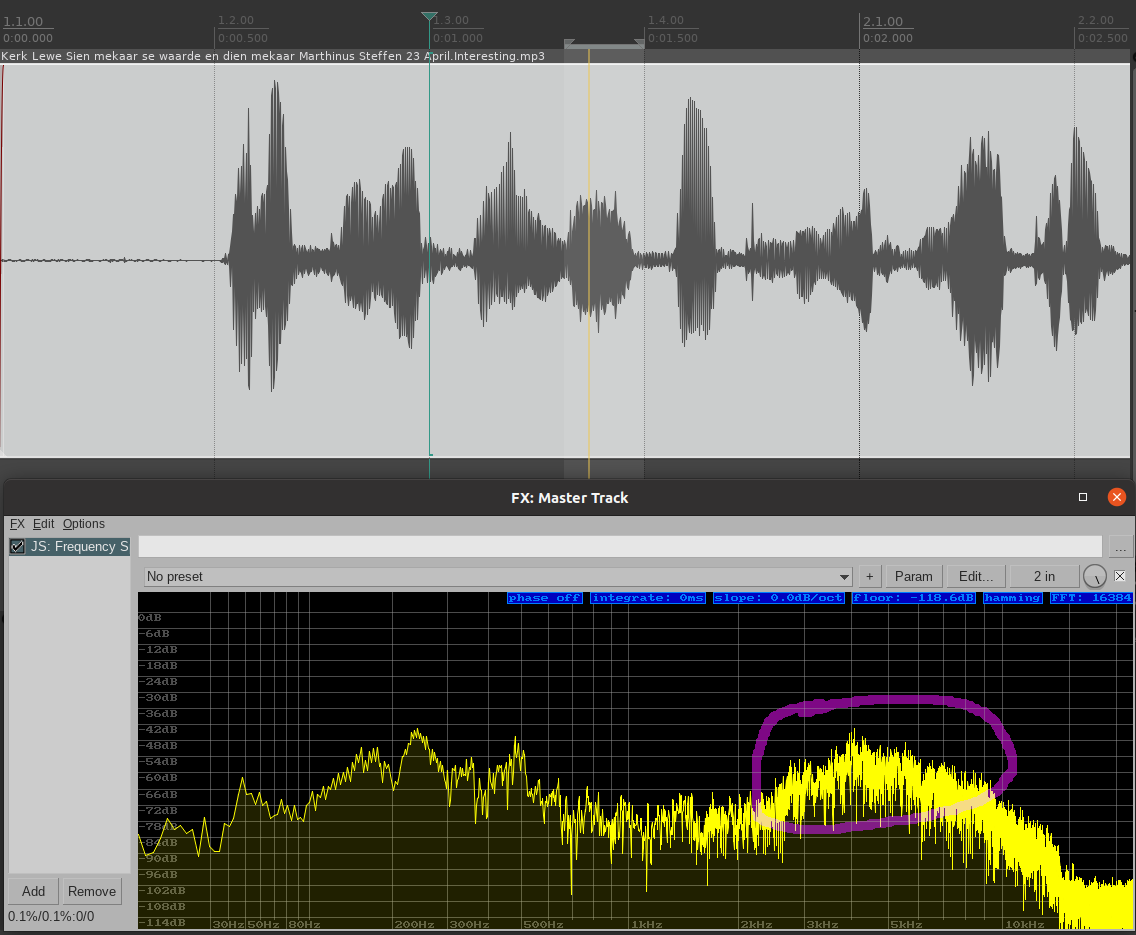 |
This is the 's' of 'wys' in 'Wil ek vir jou wys wat leer...'—note the portion that is significantly louder. The 5 kHz peaks at –50 dB, which was previously –63 dB—that’s a 13 dB difference, which represents more than four times the volume (6 dB is a doubling). |
The process of removing sibiliance is called “de-essing” or “desibilising” (https://en.wikipedia.org/wiki/De-essing).
The first step in the process of improving sound is normally recording better quality sound at the sound, thus placing the microphone further away, and aiming the microphone higher or lower (away from the mouth), as you can see in, for e.g. https://www.soundonsound.com/techniques/managing-sibilance or https://urm.academy/death-to-sibilance/.
If one already has the sound, you can process it via an EQ. The challenge with this is that taking away too much of the “s” sound results in losing clarity and presence. Thus one wants to only take away the problematic portions when they are excessive, but leave them the rest of the time, i.e. compress that which annoys, but only when necessary.
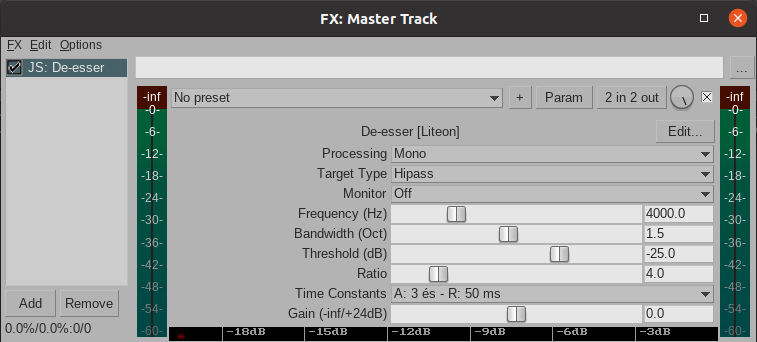 |
Reaper’s built-in 'De-esser' |
Reaper’s “De-esser” is a single-band dynamic EQ.